

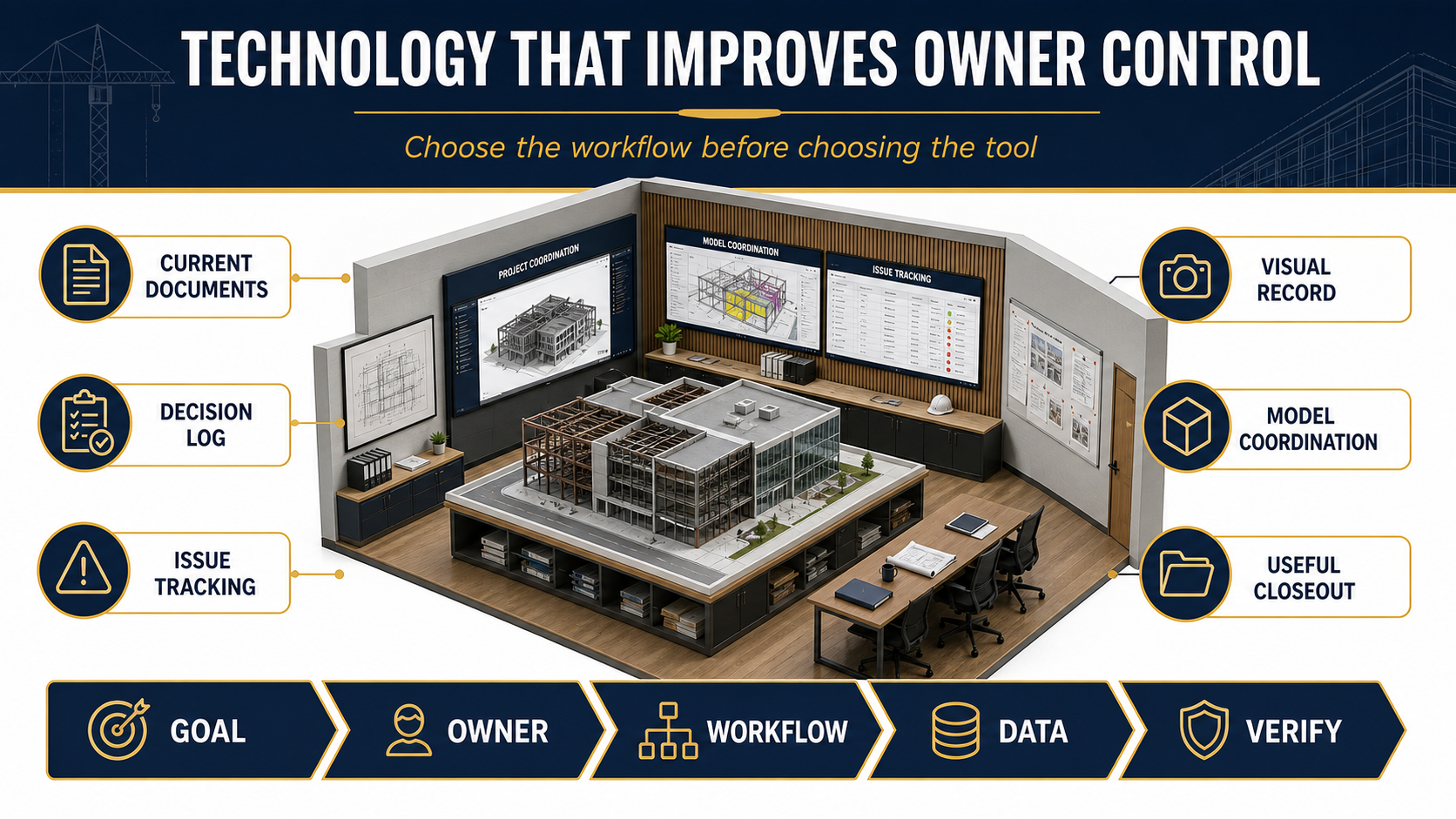
Construction technology creates value for a commercial owner when it improves a defined workflow: keeping documents current, recording decisions, tracking issues, preserving visual evidence, coordinating models or delivering usable closeout information. A tool is not a strategy, and more data does not automatically mean better control.
We recommend choosing the project outcome first, then defining the responsible person, workflow, data and verification method. This owner-focused guide separates practical construction information management from technology hype. It does not claim that every tool belongs on every project.
Why Construction Technology Needs an Owner Requirement
The AGC/Sage 2026 outlook reported that 61% of responding construction firms use artificial intelligence or plan to increase investment in it, up from 44% in the prior survey. Forty-five percent reported office or administrative uses, 23% estimating uses and 20% design or preconstruction uses.
That statistic describes survey respondents, not verified project results. It shows interest—not guaranteed accuracy, savings or productivity. Owners should require appropriate review, data protection and responsibility for any AI-assisted output. The person signing or approving a construction decision remains accountable under the project’s contracts and professional obligations.
1. Current Documents: Establish One Source of Truth
Teams need a controlled place for drawings, specifications, submittals, requests for information and other current records. The important feature is not the platform’s brand. It is whether the team can identify the approved version, distribution status and superseded information.
We ask the owner and design team to establish naming, permissions, revision handling and notification rules at the start. Field teams need practical access, but access should not blur the difference between an issued design document, an approved submittal, a contractor coordination drawing and a field note.
2. Decision Logs: Connect Choices to Cost and Schedule
A decision log should state the question, responsible decision-maker, information required, due date and effect of delay. It is more useful when tied to design release, procurement or sequence than when it merely records meeting notes.
Our preferred log distinguishes a decision from an action item. “Review flooring” is an action. “Owner to approve one of two compliant flooring options by August 30 so procurement can meet the phase-two installation date” is a decision with context.
3. Issue Tracking: Close the Loop
Digital issue tracking can organize field observations, coordination questions, punch items and responsibilities. The workflow should define what constitutes an issue, who can assign it, what evidence closes it and which items require formal design or contract communication.
A photo pin is not automatically an approved change. If an issue affects design intent, cost, time, safety or contract scope, the team should route it through the applicable formal process.
4. Visual Records and Reality Capture
Progress photographs, 360-degree imagery, scans and other capture methods can help document concealed conditions, installation sequence and existing spaces. Owners should define the intended use, capture frequency, access, retention and privacy boundaries before collecting large volumes of imagery.
Drones may support exterior or site documentation in appropriate settings, but commercial small-UAS operations are regulated. The Federal Aviation Administration’s Part 107 framework covers pilot certification, aircraft registration, operating rules and airspace considerations. A drone should be used only where the operation is lawful, safe and useful—not because aerial imagery is fashionable.
5. Model Coordination: Specify the Information Needed
Building information modeling can support planning, design, coordination, estimating and operations, but owners should define why a model is required. The National Institute of Building Sciences’ NBIMS-US V4 Project BIM Requirements guidance recommends that owners document project-specific BIM uses and information expectations before the team develops its execution plan.
Questions may include which disciplines model, the level and timing of information, coordination responsibilities, model-authority limitations, issue-resolution procedures and required handover data. This article complements our separate owner guide to BIM in construction; it does not claim BIM is required for every project.
6. Useful Closeout: Design the Handover Backward
Digital closeout is valuable when facility staff can find what they need. Owners should identify the equipment, warranties, training, approved submittals, operation and maintenance information, test records and record documents required by the contract.
We recommend reviewing closeout status during construction rather than waiting until the final week. The required format should be proportional to the owner’s ability to maintain it. A simple, organized set of reviewed documents can be more useful than a complex database without an operating owner.
| Technology outcome | Owner requirement to define | Verification question |
|---|---|---|
| Current documents | Authority, revision and distribution rules | Can a field user identify the controlling version? |
| Decision log | Decision-maker, due date and downstream effect | Are overdue decisions visible before they delay work? |
| Issue tracking | Categories, responsibility and closure evidence | Does closure mean corrected, verified and documented? |
| Visual record | Purpose, frequency, access and retention | Can the team locate imagery by area and date? |
| Model coordination | BIM uses, responsibilities and deliverables | Does the model answer an identified owner need? |
| Closeout data | Required records and facility handover format | Can operations staff retrieve and maintain the information? |
How to Evaluate a Construction Technology Proposal
Goal
State the owner or project problem in plain language. Examples include reducing document-version ambiguity, making decisions visible or organizing turnover records.
Owner
Name the person or organization accountable for the workflow. A shared platform does not remove contractual roles.
Workflow
Define how information is created, reviewed, approved, distributed, revised and closed. Include what happens when the platform is unavailable.
Data
Specify required fields, formats, permissions, retention and handover. Collect only information that serves a defined need and can be governed appropriately.
Verify
Decide how the team will test whether the workflow is being followed and whether the output is reliable enough for its intended use.
Technology Risks Owners Should Address
| Risk | Owner question | Possible control |
|---|---|---|
| Version ambiguity | Which record controls when systems disagree? | Document-control procedure and audit trail |
| Unreviewed automation | Who validates AI- or software-generated output? | Qualified human review and approval boundary |
| Access loss | What happens when a user, vendor or project account closes? | Export, retention and owner-access requirements |
| Data overload | Which information supports a real decision? | Required fields and reporting cadence |
| Privacy/security | Who can view site, tenant or facility information? | Role-based access and project-specific policy |
| Responsibility blur | Does the tool change a contractual duty? | Clear contract and execution-plan language |
Our Practical Technology Standard
We value tools that make the approved work easier to understand and manage. We do not treat a platform as proof of coordination. During preconstruction and construction, the relevant standard is whether the team can retrieve current information, identify responsibility, document decisions and verify completion.
Portfolio records such as the 351 California Street lobby project, 799 Market Street lobby renovation and CareMessage tenant improvement document completed commercial work. They do not establish use or results from any specific technology described here.
Frequently Asked Questions
Does every commercial project need BIM?
No. BIM requirements should reflect project complexity, coordination needs, delivery method and owner information needs. When BIM is required, the owner should define its intended uses and deliverables.
Can AI replace construction professionals?
No such assumption should be made. AI-assisted outputs can be incomplete or wrong and require qualified human review. Contracts, professional duties and approvals still govern responsibility.
Are drones necessary for construction documentation?
No. They may be useful for certain exterior or site conditions when legally and safely operated. Interior photography, fixed cameras, 360 imagery or conventional field records may be more appropriate in other contexts.
Who owns project data after completion?
Ownership, access, licensing, retention and handover should be addressed in the contracts and technology requirements. Do not assume platform access will continue automatically.
Review our preconstruction services, design-build coordination and commercial construction capabilities, or start a project conversation.
Primary Sources Reviewed
Constructive Solutions, Inc. is a full-service commercial construction company serving San Francisco and Bay Area.
Whatever your vision, we have the resources, experience, and insight to make your concept a reality, and a space where your business can flourish.
Call Us Now for Estimate









Leave a Reply